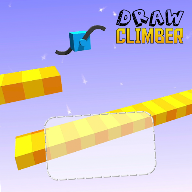
Draw a pair of legs, then redraw them whenever the ground changes
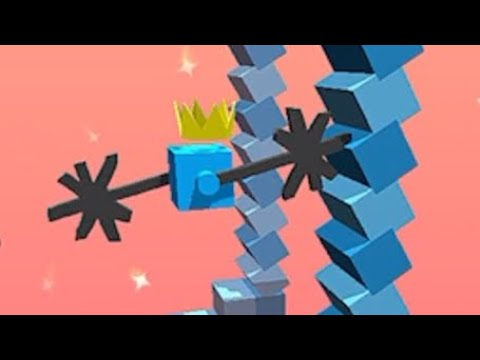 10:56
10:56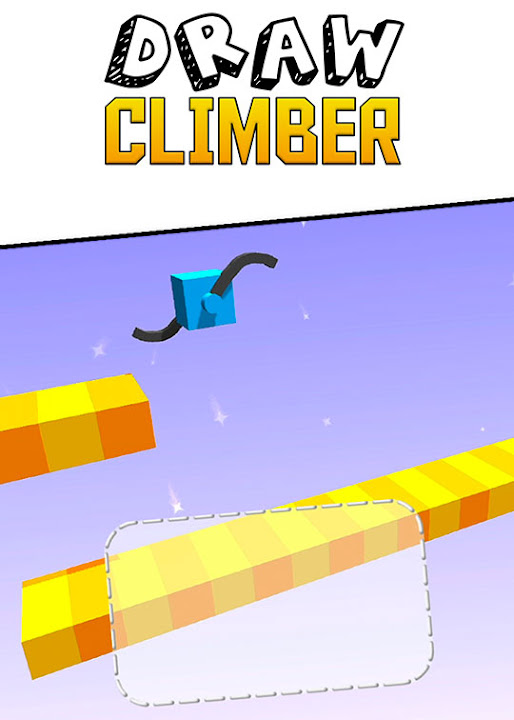
TubeGames verdict
A race where you draw your own legs; silly, short, and the best shapes are the dumb ones.
Reviewed by Max, TubeGames · Sep 17, 2026 · How we rate
Draw Climber is a race with one twist: your character is a block with no legs, and you draw them. A small pad at the bottom of the screen takes any shape you scribble, and the block runs on it. The first thing I drew was a circle. The block rolled, hit a step and stopped, and I laughed.
The loop is draw, watch, redraw. The course throws holes, steps, valleys and peaks at you, and a shape that flies on flat ground fails on a wall, so you redraw mid-race while the rival pulls ahead. Legs that are too long get trimmed in tight spots, which kills the obvious cheat. At the finish your speed launches you for extra points. Half the time a crude hook beats the clever wheel you spent three seconds on.
Complaints: once you've found two or three shapes that work, there's not much left to discover, and the course variety runs thin. The rival isn't smart, so you're racing the terrain. And drawing precisely with a thumb while the race runs is harder than it should be.
Play it if you like tinkering and don't mind a game that's done in an afternoon. Skip it if you want a real racer; this is a physics toy with a finish line.
Good
- Any shape works, and that's the joke
- Redraw mid-race, so no run is lost
- Short races, instant restart
Not so good
- Two or three good shapes and you've seen it
- Rival is dumb; you race the terrain
- Thumb-drawing is fiddly on a phone
About Draw Climber
Funniest race you have ever played! Draw your legs to win the race!
Draw Climber was published on YouTube Playables on 2023-11-28 by Voodoo. In 1047 days it has reached about 28M plays.
Draw Climber is a race where you build the thing that moves you. Instead of steering, you draw the shape of your character's legs, and that shape decides how it walks, climbs or rolls forward. When the terrain changes, the shape that worked stops working and you draw a new one mid-race.
The fun is in experimenting, because a silly scribble sometimes beats a sensible design. Races are short and the worst outcome is falling behind, so there is little to lose in trying something odd. It plays free inside YouTube with no download. Good for a few minutes of tinkering.
How to play: Draw a shape in the box to set your legs, and redraw it when the terrain changes.
Good for: casual players, short races, tinkerers
How to play Draw Climber
- Phone / tablet
- Draw a shape with your finger in the pad at the bottom of the screen, and draw a new one whenever the ground changes.
- Desktop
- Hold the left mouse button and draw the legs in the pad; redraw with a new stroke when you get stuck.
- Levels
- Numbered levels, one short race each.
- Progress
- Progress is saved the way YouTube Playables saves it; sign in to the same YouTube account on phone and desktop.
The shape sets how the block moves, so you're not steering at all; you're choosing a gait for the terrain in front of you.
Tips for the best shapes
- Try a straight line first. A single flat stroke spins like a propeller and is fast on flat ground. It's the shape I kept coming back to.
- Draw a hook for walls. A shape like a 7 or an L catches ledges and pulls the block up steps that a wheel just bumps into.
- Go long over gaps, then shrink. Long legs stride across holes, but the game trims them in tight sections, so redraw shorter as soon as the ceiling drops.
- Redraw before you stop, not after. The moment you see the ground change ahead, start the new shape. Waiting until you're stuck costs the race.
- Small and fast beats big and clever. Big detailed shapes take time to draw and often flop. A quick crude stroke that moves beats a good one that arrives late.
Draw Climber vs Hill Climb Racing
People land here from Hill Climb Racing, and the connection is thinner than the names suggest. Hill Climb is about throttle and balance over terrain in a fixed vehicle; Draw Climber replaces the vehicle with whatever you scribble, and takes steering away completely. So it's less of a driving game and more of a physics toy: you don't manage speed, you manage shape. It's also much shorter. Hill Climb has upgrades and stages that keep you busy for weeks; Draw Climber gives you an afternoon of laughing at your own drawings and then it's done. Both are worth that time.
Is Draw Climber unblocked, and is there an apk?
It runs inside youtube.com, so it usually opens on networks that filter games sites; if YouTube itself is blocked, nothing helps. There's no apk to find and nothing to install, which is also the answer to the apk searches: the phone app exists on the App Store, but the browser version here is the same game without the download. Same for the Spanish 'juego' searches; the game has barely any text, so the language doesn't matter.
How plays are counted
Public play counts for Draw Climber are re-counted every day from the YouTube Playables catalog and shown the way YouTube shows them. The total and rankings above are as of 2026-10-10.
Ratings & reviews
No written reviews yet — tap the stars and tell other players what you think.
Elsewhere: 4.7★ (261,716 ratings) on App Store · 7.9/10 (32,194 votes) on CrazyGames
How we rate
The TubeGames rating is our estimate, not a vote. It combines public ratings of the same game elsewhere (App Store 4.7★ (261,716 ratings), CrazyGames 7.9/10 (32,194 votes)) with how it holds up on YouTube Playables: how many people play it and whether they keep playing weeks after launch. Once 10 players rate Draw Climber here, their average becomes the headline score.
Similar Racing games on Playables
 Build a Queen
100M plays
 Bridge Race
65M plays
 Race Master 3D
84M plays
 Aquapark.io
40M plays
 Hill Climb Racing Lite
28M plays
 Turbo Stars
27M plays